GoDaddy Website Builder SEO: The Wizard, Its Limits and the URL Trap
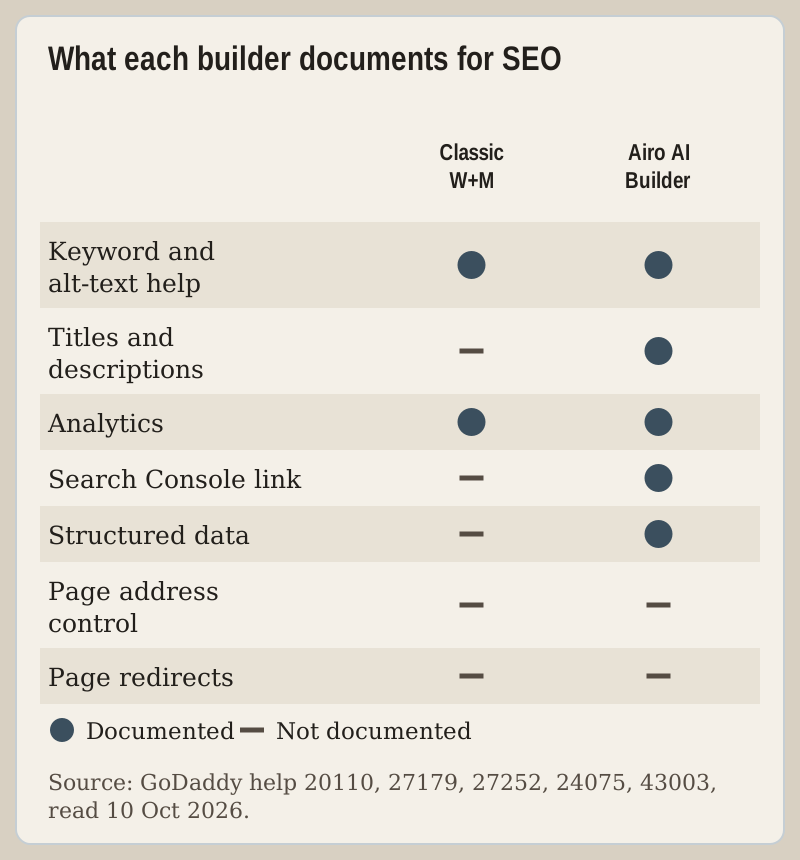
GoDaddy Website Builder is good enough at SEO for a local business that needs to be found by name, service and town, and a ceiling for a site that wants to win search traffic with content. The classic Websites + Marketing builder gives you a guided SEO wizard that writes keywords into your copy and image alt text on up to five pages, plus settings for Google Analytics and a Google Business Profile. What GoDaddy's help centre does not document is just as important: no page-level redirects, no control of page addresses, and no Search Console field.
If you are on the newer Airo AI Builder, the picture is different and in some ways better, and it has its own section below. Check which builder you have first, because the menus are not the same.
The SEO wizard, step by step
GoDaddy's "Improve my website's SEO" article, read on 10 Oct 2026, gives the route for a Websites + Marketing site:
- Open your GoDaddy product page, expand Websites + Marketing and select Manage next to the site.
- On the dashboard, expand Marketing and select SEO.
- The first time, the wizard uses AI to analyse the site and suggest the keywords it thinks will help most. Select Publish Changes to accept them, or Not Yet to review them later.
- Select Publish Now to make the changes live.
On accepting, GoDaddy adds the keywords to your page content and to image alt tags. Run it again later and you get the option to edit the settings instead. The wizard covers up to five pages; for the rest, GoDaddy sends you to the builder's Settings and then SEO Settings, where you work page by page.
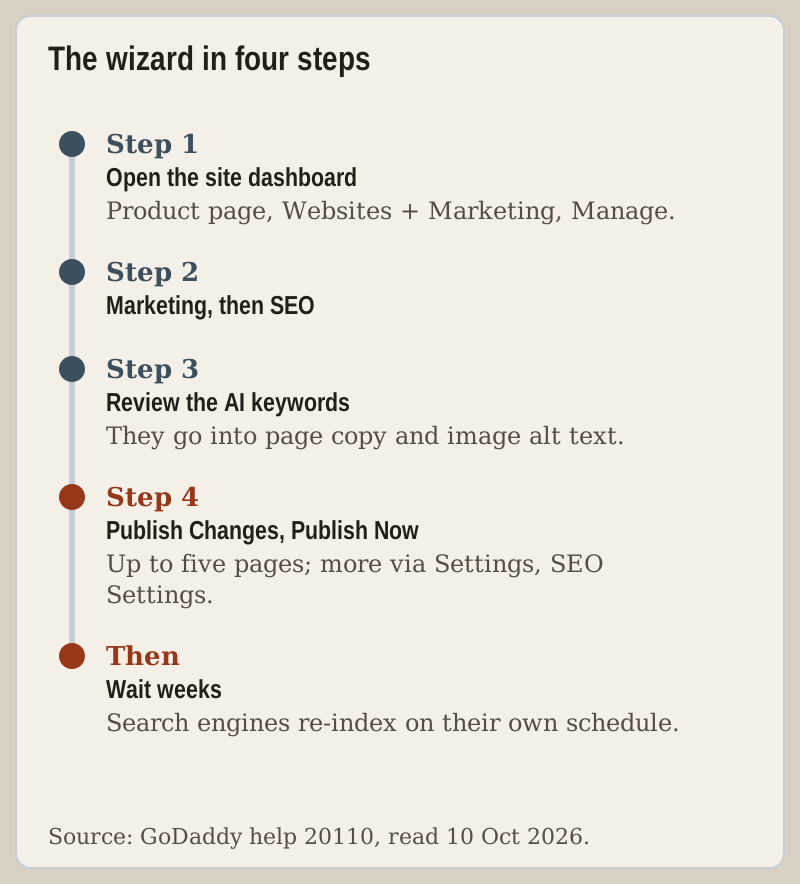
Two cautions before you press Publish Changes. Read the copy after the wizard has worked on it, because keywords inserted into sentences can read badly to the people you want to call you. And set expectations: GoDaddy says it can take up to eight weeks for the changes to affect rankings, because search engines re-index on their own schedule.
Which plans include it
GoDaddy's wording is that its Digital Marketing plans "and most Websites + Marketing plans" include SEO. It does not name the exceptions on that page, and reviews disagree about which tier misses out, so we will not guess. The practical test takes ten seconds: if Marketing then SEO appears on your site's dashboard, your plan has the wizard. The free tier is a separate question, covered in our free website limits map; a site on a godaddysites.com address is not the place to build search traffic in any case.
Analytics, Business Profile and Search Console
Three connections matter more than the wizard for most small businesses, and two of them need no code.
Google Analytics. In the builder, open Settings, choose Google Analytics and paste your tracking ID, then publish. GoDaddy says to wait at least 24 hours before expecting data. The same Settings area takes a Facebook Pixel, Facebook and Pinterest meta tags and Google AdSense, so you never need an HTML section for them. GoDaddy also reminds you to let visitors set cookie and tracking preferences, which is a legal point, not a style one.
Google Business Profile. For a business that serves people locally, this is the strongest search asset GoDaddy connects. From the dashboard, open Marketing, then Social, choose Google and connect an existing profile or create one; GoDaddy notes Google can take up to 3 days to verify it. Keep the name, address and phone in the builder's Settings, under Basic Information, identical to the profile.
Google Search Console. GoDaddy's help lists meta-tag fields for Facebook and Pinterest but none for Google, and we found no Search Console article for the classic builder. The route that needs nothing from the builder is Google's own: add your site in Search Console as a Domain property and verify it with the DNS TXT record Google gives you, added at whoever manages your domain's DNS.
What the builder does not document
Our HTML guide shows how far custom code reaches: it lives inside a page section. GoDaddy documents no way to add code to the page head, and we found no help article for structured data, canonical tags, robots rules or a sitemap setting in the classic builder. None of that stops a local site ranking for its own name and services. It does matter if you plan dozens of articles competing for the same queries as established publishers.
The URL trap: renaming a page
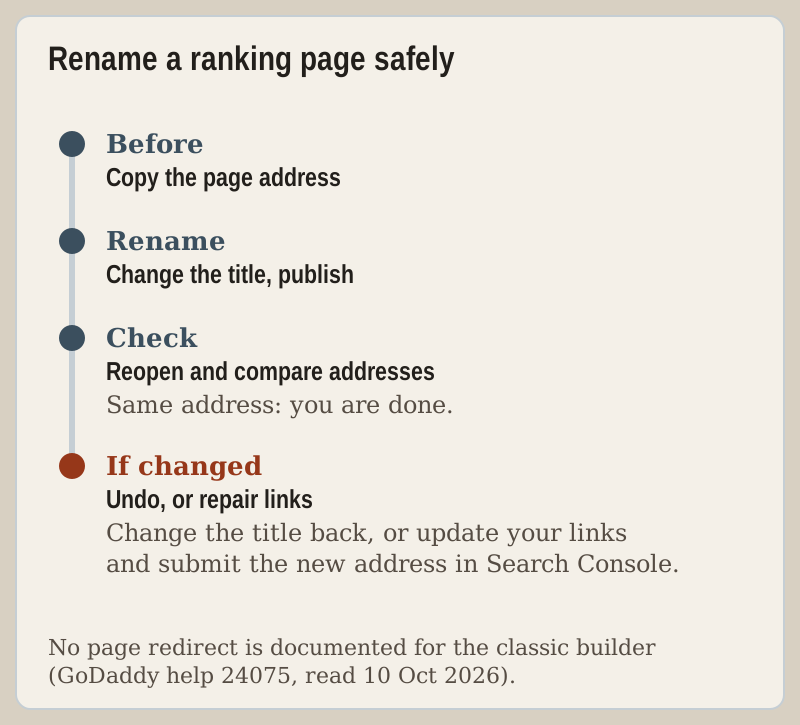
GoDaddy's page-settings article covers changing a page's title and its navigation and footer toggles, and says nothing about the page's address. Independent reviews have reported that the address follows the title, so a rename can quietly move a page that already ranks. We cannot confirm that from GoDaddy's documentation, which is exactly why it deserves a habit rather than a hope.
Before renaming any page that gets search traffic, copy its current address. Rename it, publish, and open the page again. If the address changed, the old one is now a dead link for everyone who found you through search or a link. GoDaddy documents no page-level redirect for the classic builder, so the fix is to change the title back, or, if the rename must stand, update every link you control and submit the new address in Search Console. GoDaddy's domain forwarding is not a substitute: its help says forwarding replaces the domain's root A record, so it suits a spare domain pointed at your site, not one page on it.
Airo AI Builder's SEO works differently
On Airo AI Builder, GoDaddy says much of the optimisation is automatic. Every published page gets structured data, clean semantic markup, unique page titles and meta descriptions, and the site gets an llms.txt file for AI crawlers. Each publish is scored for search health from 0 to 100, and a drop of 10 points or a new issue raises an alert. You can ask for an audit in the chat ("check my SEO"), get separate SEO and answer-engine reports, and select Fix all issues. Because audits and fixes go through the chat, expect them to draw on your AI credits.
Two rules decide whether any of it counts. A site on its default Airo address is excluded from search results even when published, so indexing starts only with a custom domain, which needs a paid plan. And once you publish on a custom domain, Airo submits the site to Bing, Yandex and Naver automatically; for Google, you ask Airo to connect Search Console.
When SEO should push you elsewhere
If search traffic from articles is the business plan, choose a platform that documents the controls this page found missing. Squarespace documents permanent 301 redirects in its URL mappings panel, and sells four plans from $19 to $99 a month on annual billing with a 14-day trial (as of 9 Oct 2026). WordPress, including GoDaddy's own Airo for WordPress on Managed Hosting for WordPress, gives you plugin-level control of everything above. If the job is a local business site found by name and neighbourhood, stay put, run the wizard, connect the Business Profile and keep building from GoDaddy's builder page.
Edge cases
- Moving to a new domain. Every page address changes at once. Keep the old domain and point it at the new site with GoDaddy's domain forwarding, so old links at least land on your home page, and add the new domain in Search Console.
- Online-only businesses. GoDaddy notes that a business with no local, face-to-face presence may not qualify for a Business Profile, and steers you to the SEO wizard instead.
- Private pages. GoDaddy's private pages are visible only to signed-in members, so search engines cannot read them. Keep anything you want found public.
Troubleshooting: GoDaddy SEO questions
Is GoDaddy Website Builder good for SEO?
How do I use the GoDaddy SEO wizard?
How do I add Google Analytics to a GoDaddy website?
How do I connect a GoDaddy website to Google Search Console?
How long does GoDaddy SEO take to work?
Zoom out from this procedure: read the full GoDaddy Website Builder review or browse the tutorial index.