GoDaddy Airo Review (2026): What Airo AI Builder Builds and Who It Suits
Airo AI Builder is worth trying if you want a small business site, a simple store or a custom web tool and you are happy to build it by describing it in a chat. It is the product GoDaddy now sells as its website builder in the US, with a free tier of 50 AI credits a month and paid plans at $9.99, $24.99 and $99.99 a month billed annually (as read on 9 Oct 2026). Skip it if you want a predictable multi-year bill, because GoDaddy does not print what the plans renew at, or if you need a mature store with every feature in place today.
This is a documentation review, not a hands-on lab report. Every capability below comes from GoDaddy's own builder page and help centre, read on 9 and 10 Oct 2026, and every gap is one GoDaddy states or leaves unstated. For the classic editor this site has covered since launch, see our GoDaddy Website Builder review.
One brand, several products: the Airo decoder
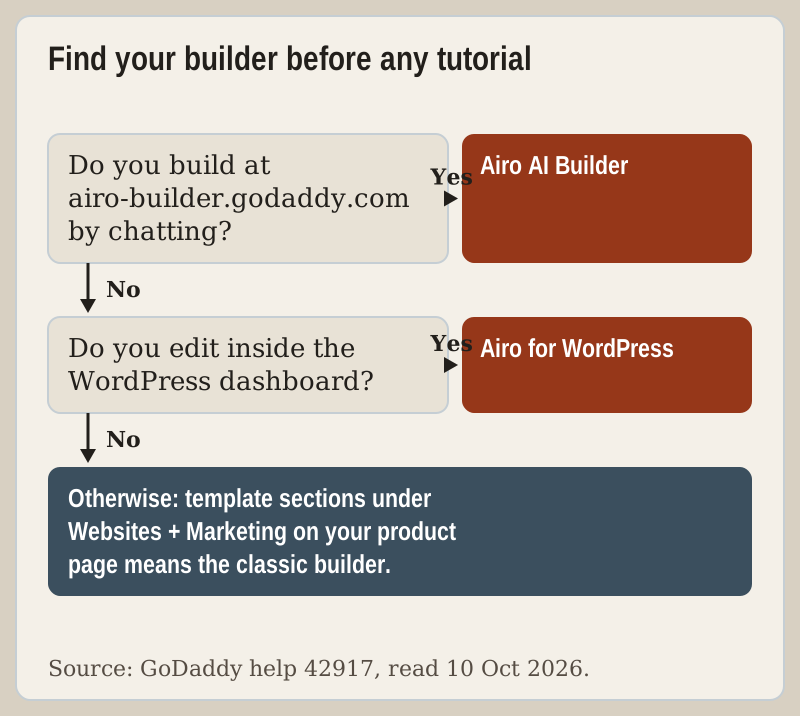
Most confusion about "GoDaddy Airo" comes from the name being stretched across products that work differently. GoDaddy's help article on telling its builders apart, read on 10 Oct 2026, lists three:
- Airo AI Builder. The subject of this review. A standalone product with a free tier and paid plans, edited by conversation, by direct manual editing or at code level. It builds websites, web apps, games and online stores. GoDaddy's US builder page markets it simply as "GoDaddy Website Builder", which is why so many people meet it under that name.
- Websites + Marketing, the classic builder. Template-based, edited section by section. GoDaddy describes its AI as limited, for example text suggestions and SEO help, and says it builds websites only.
- Airo for WordPress. Comes with Managed Hosting for WordPress. Airo builds a WordPress site from a conversation, and you then run it in WordPress with plugins and WooCommerce.
GoDaddy stresses that Airo AI Builder and Airo for WordPress share a brand but build different things. That help article no longer lists the earlier "GoDaddy AI Website Builder", so if you built a site on it, open the article and check which of the three editors your site now opens in before following any tutorial, including ours.
What Airo AI Builder actually builds
You start by signing in, opening Airo AI Builder and typing a description of the idea into one text box. From there GoDaddy's build article lists the ways to work on the result. You can chat with Airo to change code, add features or have it explain how something is implemented. You can preview the site, select any part of it and edit it directly with a toolbar, open the Code view to edit the files, add images, video or documents, and manage visuals in Media. A Settings tab adds a Database view for editing tables and a Secrets store for API keys and access tokens.
That last pair is what separates Airo from a page builder. A booking flow that writes to a table, a quote calculator or a small internal tool is the kind of project this makes possible. GoDaddy's builder page pitches one-click deployment on GoDaddy hosting with SSL, forms and analytics built in, and says you can export your code at any time. Online stores are handled through a product catalogue, shipping rates, sales tax and payouts, each with its own help article.
Payments are the least finished part. To connect GoDaddy Payments you paste a prompt GoDaddy supplies into the chat and answer its follow-up questions, and GoDaddy's article notes that some e-commerce features are not supported on GoDaddy Payments for Airo AI Builder at this time. It points to Stripe as the fallback when a feature is missing. For a shop with a few dozen products that is workable. For a store whose margins depend on a specific checkout feature, test that feature on the free tier before paying.
Credits: what you spend and what you don't
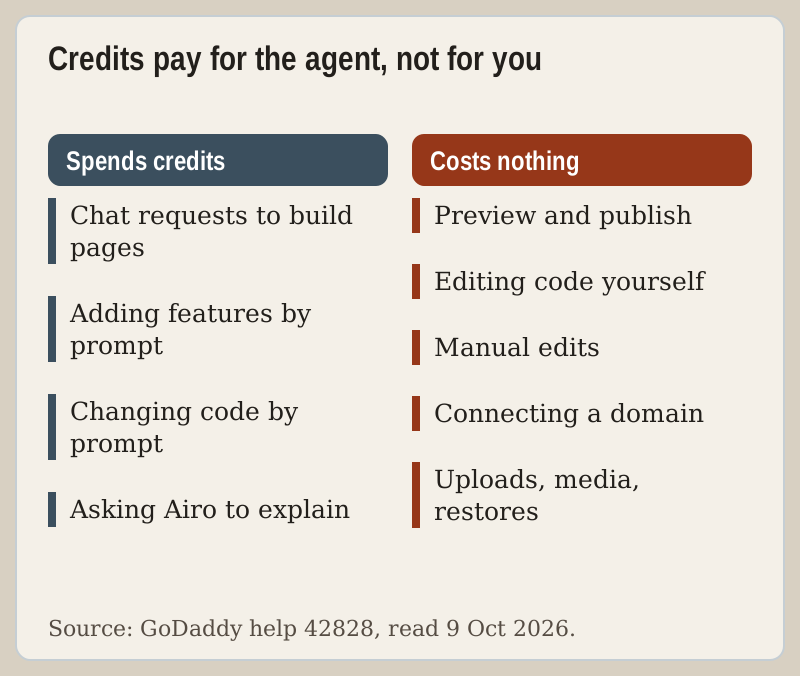
A credit is spent whenever Airo's agent does work, which in practice means each request you make in the chat. Everything you do by hand is free: previewing, publishing, editing code, direct edits with the toolbar, connecting a domain, uploading files, managing media and restoring an earlier version. GoDaddy's own advice in its backup article is to use direct editing for small changes such as swapping text, an image or a colour, both because it costs nothing and because it cannot make changes you did not ask for.
Your plan's monthly credits refill on the same day each month as your plan's renewal date, and unused ones do not carry over. When they run out, Airo shows when the allowance resets and offers an upgrade; you can also buy a one-time pack from the Manage my plan page. Bought credits last a year, are spent before plan credits if they expire sooner, and work only in Airo AI Builder in the account that bought them. A sensible budget is to spend credits on the first build and on genuinely new features, then live on manual edits.
Plans and what GoDaddy prints about them
| Plan | Price, billed annually | AI credits a month | What the plan card adds |
|---|---|---|---|
| Free | $0 | 50 | No card needed; renews monthly |
| Starter | $9.99/mo | 150 | 1 published site or app; pay links and QR codes |
| Professional | $24.99/mo | 300 | Up to 10 published sites or apps, payments, bookings, catalogue |
| Ultimate | $99.99/mo | 750 | Up to 50 published sites or apps; aimed at multichannel sellers and agencies |
Every paid plan includes 24/7 support, SSL and DDoS protection, collaboration and code download, and a new annual plan adds one free domain. Switched to monthly billing, the same page lists $19.99, $49.99 and $199.99 a month (read 10 Oct 2026). GoDaddy says annual plans carry an extra first-year discount, which means the renewal will be higher, but the page does not print the renewal price. We have not used third-party renewal figures. Our GoDaddy plans comparison works through the per-credit arithmetic and the classic plans' record in full.
Airo AI Builder vs the classic Websites + Marketing builder
| Feature | Airo AI Builder | Classic Websites + Marketing |
|---|---|---|
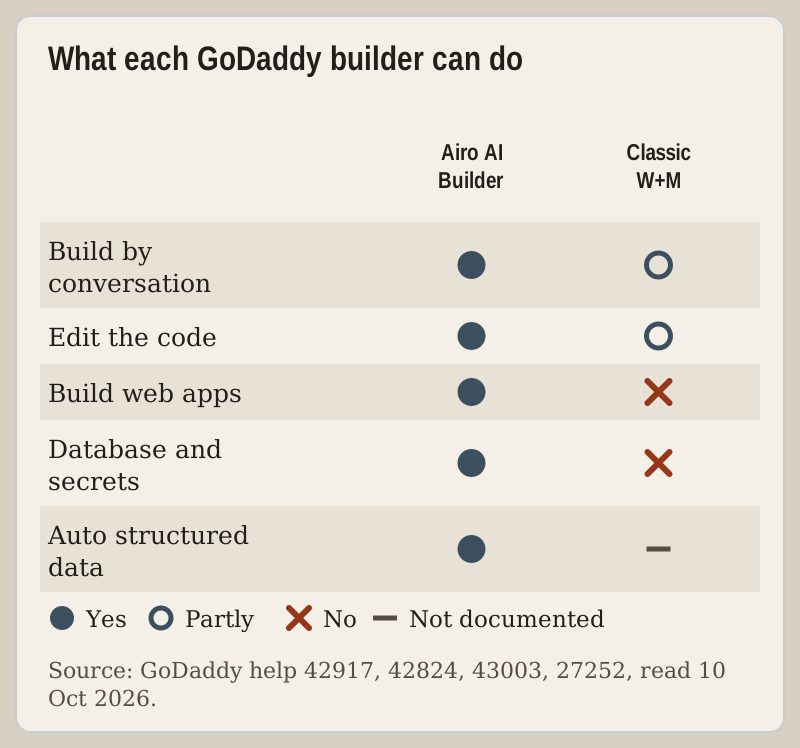
| How you edit | Chat, direct editing and code | Templates and sections, edited by hand |
| What it builds | Websites, web apps, games, online stores | Websites only |
| Custom code | Full file access in a Code view | HTML, CSS and JavaScript inside an HTML section |
| Search tools | Automatic titles, descriptions, structured data and llms.txt; audits on request | An SEO wizard that optimises up to 5 pages, more via SEO Settings |
| Undo and recovery | Version history plus file and database backups | Version history and backups for the site |
| Custom domain | Paid plan and a published project required | Paid plan required |
The practical split is simple. If you want a conventional brochure site, a blog and GoDaddy's email-marketing tools, and you would rather pick a template than describe a site, the classic builder is the calmer tool, and existing customers lose nothing by staying. If you want something a template cannot hold, such as a tool, a portal or a custom booking flow, Airo is the only one of GoDaddy's builders that does it.
Limitations GoDaddy documents
- The publish wall. A site on the default Airo address is excluded from search results even when published. Connecting a custom domain needs a paid plan and a published project, so the free tier is a sandbox.
- Project caps. The plan cards allow 1 published site or app on Starter, up to 10 on Professional and up to 50 on Ultimate (read 10 Oct 2026), so anyone planning several projects should skip Starter.
- Downgrades. Moving from a paid plan to Free takes your published projects offline; the content is kept and comes back when you upgrade.
- Backups. Only images and files you upload are kept in backups, and Airo does not store generated images or logos between sessions unless you upload them. Keep your own copies.
- Deleted apps. GoDaddy keeps records of a deleted app for up to 30 days, and recovery through support is not guaranteed.
- Branding. Removing Airo branding is listed as coming soon on the Professional card.
Who should pick Airo, who should pick classic, who should leave
Pick Airo AI Builder if you want a custom site or tool, you are comfortable describing what you want and then checking the result, and you can live with an open renewal price for now. Start on Free, build the first version, and pay when you are ready to publish on your own domain. When you are ready, GoDaddy's builder page is where the plans are sold.
Stay on, or choose, classic Websites + Marketing if your site is a conventional brochure with a blog and you want templates rather than a conversation. Choose Airo for WordPress if you need plugins or WooCommerce.
Leave GoDaddy for a builder that prints its renewals if the long-term bill decides it. Hostinger's website builder prices Premium at $2.99 a month when you prepay 48 months, then $10.99 at renewal, with up to 3 websites and 5 one-time AI credits. Squarespace is the design-first option: no free plan, a 14-day trial, and four plans from $19 to $99 a month on annual billing. Both as of 9 Oct 2026.
Edge cases
- Contact form email lands in spam. GoDaddy's DNS help says your domain needs an SPF record including secureserver.net, merged into any SPF record you already have.
- Domain at another registrar. Airo can connect DNS automatically when it is managed by GoDaddy, Cloudflare or 123-Reg; elsewhere you copy the A and CNAME records it shows. Those records are unique to each project, so never reuse one project's set on another.
- Domain in another GoDaddy account. Airo gives you an authentication URL to open while signed in to that account.
- A restore went too far. Restoring from a backup overwrites the current site. Preview the version first, and remember a restored site still needs publishing.
Troubleshooting: Airo AI Builder questions
Is GoDaddy Airo worth it?
How much does Airo AI Builder cost?
Does Airo AI Builder have a free plan?
Is Airo the same as GoDaddy Website Builder?
Can I export my code from Airo AI Builder?
Zoom out from this procedure: read the full GoDaddy Website Builder review or browse the tutorial index.