How to Connect a Domain to GoDaddy Website Builder (Any Domain Source)
To connect a domain to a GoDaddy Websites + Marketing site, open the site in the editor, go to Settings, select Manage next to the domain name, choose On a domain I already own (or Change my domain if one is already connected), pick the domain, then Save & Publish. GoDaddy says the change usually shows within a few minutes and can take up to 72 hours.
That is the whole job when the domain sits in the same GoDaddy account as the site. It gets longer in two cases: when you need to buy the domain first, and when it is registered somewhere else and you have to edit DNS records at that registrar. This manual page covers all three, with the walls you can hit before you start and a troubleshooting table for when the address still shows the wrong thing. Every step below matches GoDaddy's own help articles as we read them on 9 Oct 2026.
Before you start: three checks
- You need a paid plan. GoDaddy's help centre states that if you are on a Websites + Marketing free trial, you must sign up for a paid plan before you can connect a domain. The free tier publishes on a godaddysites.com address only; our free website limits map shows the rest of that wall.
- The domain must be in the same GoDaddy account as the site. If it is in a different GoDaddy account, move it into this one first, then follow Procedure A. A domain missing from the list in step 7 is almost always this problem.
- Know which builder you have. These procedures are for the classic Websites + Marketing builder. GoDaddy now also sells Airo AI Builder, a separate product with its own domain-connection article; the note at the end of this page covers it.
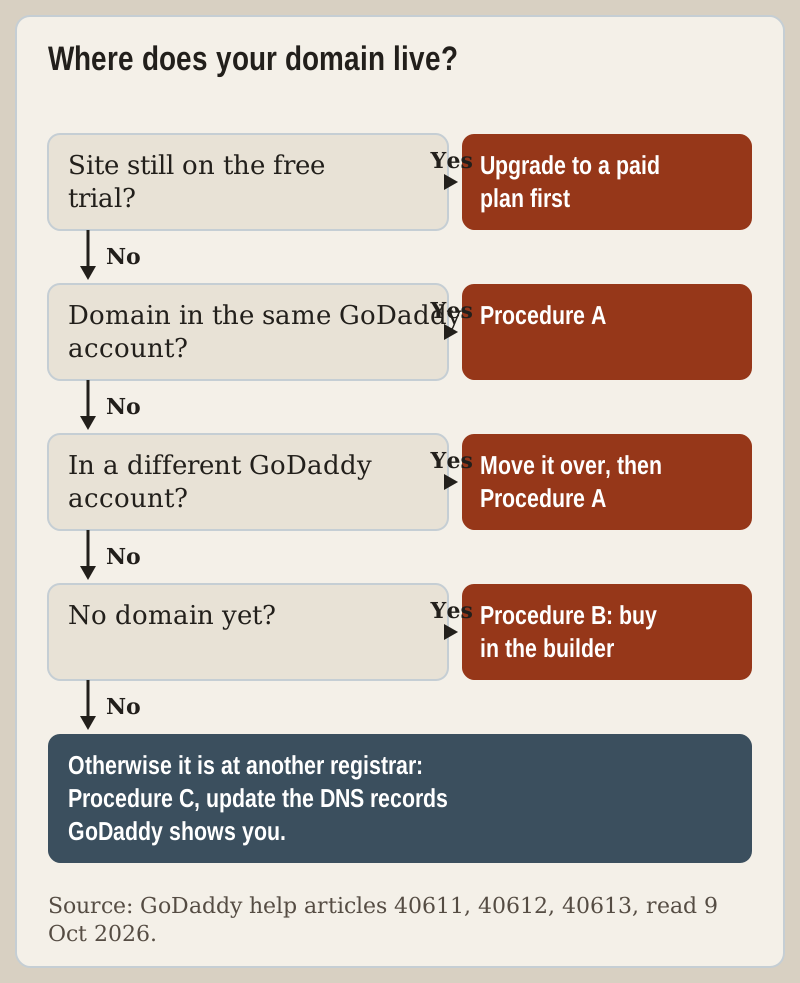
Procedure A: a domain already in your GoDaddy account
- Go to your GoDaddy product page.
- Scroll down, expand Websites + Marketing and select Manage next to your website.
- Select Edit Website (or Edit Site) to open the builder.
- Select Settings.
- Next to your domain name, select Manage.
- If no domain is connected yet, select On a domain I already own. If one is, select Change my domain.
- Select the domain from the list, then Continue.
- Check that the right domain is selected, then select Save & Publish.
If the domain is not in the list at step 7, stop. GoDaddy's article says it may be in a different GoDaddy account, and the fix is to transfer it to the same account as the website before trying again.
Procedure B: buying a new domain from inside the builder
Start exactly as in Procedure A, then branch at the domain screen:
- Follow Procedure A steps 1 to 5, ending at Manage next to your domain name.
- Select Get a new domain, then Continue.
- Pick from GoDaddy's suggestions, which are based on your free domain name, or search for a name.
- Follow the prompts to add optional protection and complete the purchase.
- Select Continue to return to the connection screen.
- Check the new domain is selected, then Save & Publish.
GoDaddy notes that hosting your website and owning the domain are billed separately. The domain has its own renewal date, which matters later if you ever unpublish the site or change plans: a dark site does not stop a domain renewal.
Procedure C: a domain at another registrar (DNS records)
This is the only route where you leave GoDaddy. It starts the same way:
- Follow Procedure A steps 1 to 5, ending at Manage next to your domain name.
- Select On a domain I already own, or Change my domain if one is connected.
- Select Use a different domain.
- Enter the domain and extension without "www" in front. Enter mycoolsite.com, not www.mycoolsite.com.
- Select Continue.
- GoDaddy opens a window with DNS information specific to your site. Sign in to your DNS provider (usually the registrar you bought the domain from) and update the records to match.
- Return to the GoDaddy product page and select I'm done, continue setup.
- Check the domain, then Save & Publish.
CAUTION: GoDaddy shows the exact DNS values for your site in its DNS window, and they are the only values to use. Copy them from that window, not from a forum post or an old guide. GoDaddy also states plainly that it cannot change records at another provider for you; if you are stuck, it is your DNS provider's support that can help.
Keep the GoDaddy window open while you edit records in the other tab, and change only the records GoDaddy names. Leave email records such as MX alone unless you mean to move email too.
How long it takes, and how to tell it worked
GoDaddy's figure is "usually a few minutes" and "up to 72 hours". The longer end is more likely with a domain at another registrar, because the new records have to spread through DNS.
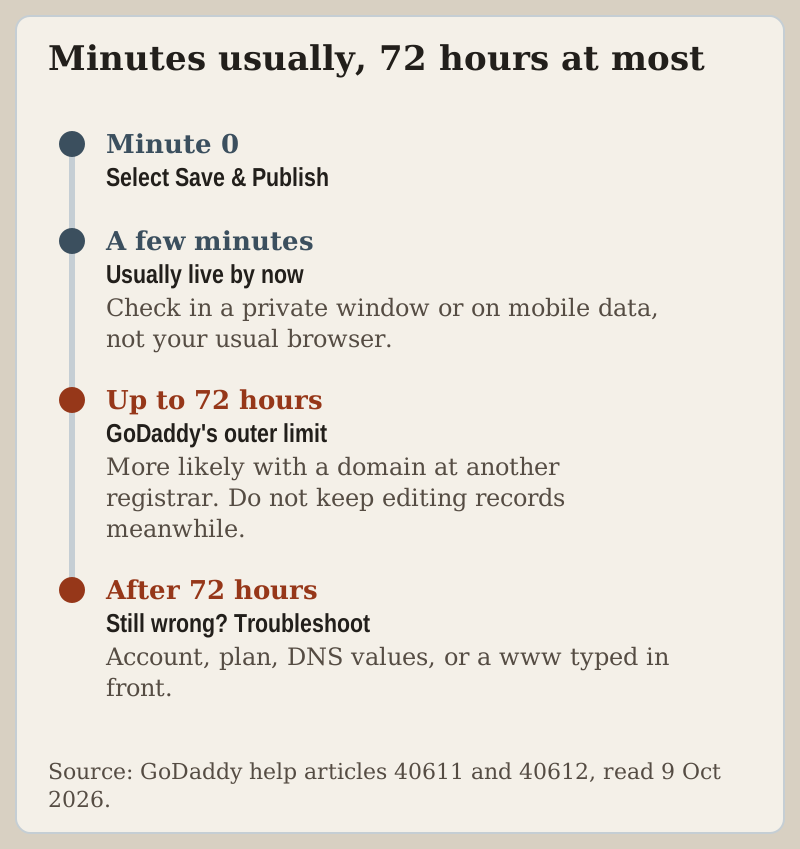
To check, open the address in a private browser window or on a phone using mobile data, so a cached copy does not fool you. If you see your site, you are done. If you see a parked page or the old site, wait out the 72-hour window before you change anything; editing records repeatedly while they propagate only makes it harder to tell which change worked.
Troubleshooting: domain shows the wrong thing
| Symptom | Likely cause | Fix |
|---|---|---|
| Domain missing from the list at step 7 | It is in a different GoDaddy account | Move it to the site's account, then repeat Procedure A |
| No option to connect at all | Site is on the free trial or free tier | Upgrade to a paid plan first |
| Old or parked page after saving | Change still propagating | Wait up to 72 hours, check in a private window |
| Outside domain never resolves | DNS records not updated at your provider | Re-enter the values from GoDaddy's DNS window |
| Setup rejects the domain | Entered with "www" | Enter the bare domain, for example mycoolsite.com |
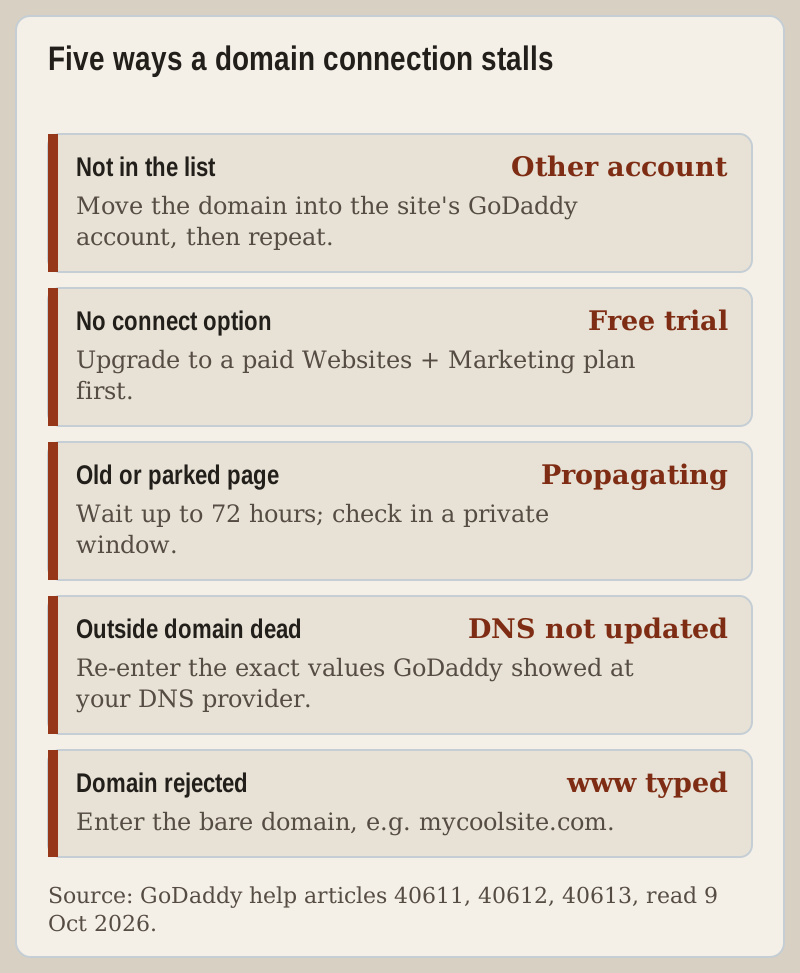
If none of these fits, the next stop is GoDaddy support for a domain in your GoDaddy account, or your registrar's support for an outside domain.
Changing or disconnecting a domain later
To swap domains, run Procedure A again and choose Change my domain at step 6. The site moves to the new address after Save & Publish, with the same propagation window. Two things to plan for: the old domain keeps renewing on its own schedule until you cancel it, and any links, business cards or ads pointing at the old address need updating. If the old domain has search history, consider keeping it and forwarding it to the new one rather than letting it lapse.
Which plan you need, and the Airo note
Any paid Websites + Marketing plan lets you connect a domain; the free tier does not. Plan prices and what each tier adds are on our GoDaddy plans page. If you are still choosing a builder, GoDaddy's builder page is where a new account starts, and if price over three years matters more than the bundled marketing tools, our GoDaddy vs Hostinger bench comparison puts Hostinger's builder side by side.
Airo AI Builder. GoDaddy's newer Airo AI Builder is a separate product and has its own help article for connecting a domain. Its builder page says a new annual Airo plan comes with one free domain, and its help article on connecting a domain says this needs a paid Airo plan and a published project. GoDaddy's credits FAQ confirms that connecting a domain does not spend AI credits. The Websites + Marketing menus above do not apply to it.
Troubleshooting: connecting a domain
How do I connect my domain to GoDaddy Website Builder?
Can I connect a domain on the GoDaddy free plan or trial?
How long does it take for a domain to connect to a GoDaddy site?
Can I use a domain from another registrar with GoDaddy Website Builder?
Why is my GoDaddy domain not in the list to connect?
Zoom out from this procedure: read the full GoDaddy Website Builder review or browse the tutorial index.